


Collaboration and knowledge management are essential aspects of modern business operations. However, finding the right tool to streamline these processes can be challenging. That's why we're comparing two leading platforms in this space—Slite vs Notion—to help you make an informed decision.
By the end of this comparison, you'll have a clear understanding of the key features, differences, and use cases of Slite and Notion, enabling you to choose the best tool to enhance collaboration and knowledge management in your business.
- 01 Slite vs Notion: overview
- 02 What's the difference between Slite and Notion?
- 03 Slite pros and cons
- 04 Notion pros and cons
- 05 Slite compared to Notion
- 06 Notion compared to Slite
- 07 Features comparison
- 08 Slite vs Notion: Which is the best for your business?
- 09 Alternatives to Slite & Notion
- 10 Promotions on Collaboration software
Start saving on the best SaaS
Secret has already helped tens of thousands of startups save millions on the best SaaS like Microsoft Teams, Google Workspace & many more. Join Secret now to buy software the smart way.

01 Slite vs Notion: overview
Slite and Notion are two prominent contenders in the realm of collaboration and knowledge management, each offering unique features tailored to meet specific user needs.
Slite is recognized for its simplicity and ease of use, making it particularly popular among teams looking for a straightforward solution for real-time collaboration and content creation. With its intuitive interface and focus on structured organization, Slite excels in facilitating seamless teamwork and efficient information sharing. On the other hand, Notion offers a highly customizable workspace that caters to a diverse range of use cases, from note-taking and project management to database creation and task tracking. Its versatility and flexibility make it a favorite among teams seeking a single platform to manage all aspects of their workflow.
To determine the best fit between Slite and Notion, it's essential to evaluate your team's specific requirements, workflow preferences, and the nature of your projects. Slite may be the preferred choice for teams prioritizing simplicity and collaborative content creation, while Notion's extensive customization options make it ideal for those seeking a versatile solution to accommodate diverse workflows and organizational structures.

Integrations
Slite has basic integrations with other tools like Slack and Asana. Notion boasts a larger ecosystem of integrations, including Google Drive, Trello, and various APIs for customization.

Slite
Notion
Database functionality
Slite is not focused on database functionality; it's more about collaborative writing and information sharing. Notion, on the other hand, offers advanced database features with custom views and properties, suitable for complex data management.
Slite
Notion
Customer Support
Slite provides standard customer support through email and help articles. Notion is known for a more robust support system with active community forums and responsive customer service.
Slite
Notion
Customer Reviews
Slite receives positive feedback for its clean interface and focus on team documentation. Notion is highly praised for its all-in-one workspace that offers a wide range of features for notes, tasks, databases, and wikis.
Slite
Notion
Ease of Use
Slite is designed for simplicity, making it easy for teams to collaborate on documents. Notion, while powerful, has a steeper learning curve due to its vast array of features and customization options.
Slite
Notion
Template gallery
Slite has a modest set of templates for meeting notes and project docs. Notion provides an extensive gallery of templates for various uses, from personal productivity to complex team workflows.
Slite
Notion
Content organization
Slite uses channels and tags for content organization, which is intuitive for documentation structuring. Notion offers a more flexible hierarchy with nested pages and databases, catering to both simple and complex organizational needs.
Slite
Notion
Mobile app
Slite's mobile app provides access to documents and basic editing features. Notion's mobile app is more robust, allowing for a near-complete experience as on desktop, though some users find it less intuitive than the web version.
Slite
Notion
Pricing Plan
Slite offers a free version for small teams, with premium features starting at $10 per user/month. Notion also has a free version for individuals, with team plans starting at $8 per user/month, offering more advanced features.
Slite
Notion
Collaboration features
Slite offers real-time editing and commenting, suited for documentation and knowledge sharing within teams. Notion excels with its versatile collaboration tools, allowing for comments, mentions, and real-time editing across a broader range of content types.
Slite
Notion
02 What's the difference between Slite and Notion?

Slite is crafted with simplicity and real-time collaboration in mind, making it an ideal choice for teams seeking an intuitive platform for content creation and sharing.
Slite
Your team’s solution for instant answers
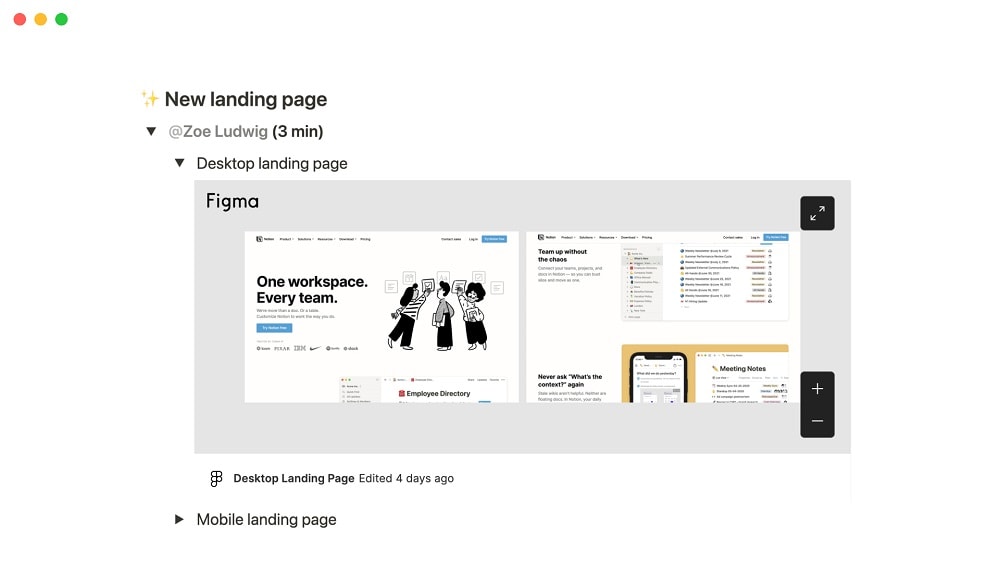
Notion offers a highly customizable workspace that appeals to users with diverse workflow requirements and project complexities.
Notion
Knowledge base, project management, note taking, and more. Notion leverages AI to centralize your team's work, facilitate collaboration, ensure proper project follow-up, and boost overall productivity and efficiency.
Slite and Notion both serve as versatile platforms for team collaboration and knowledge management, yet they diverge in their approach and target user base. The key difference between Slite and Notion lies in their focus and feature sets, catering to distinct user needs and preferences.
Slite is crafted with simplicity and real-time collaboration in mind, making it an ideal choice for teams seeking an intuitive platform for content creation and sharing. Its streamlined interface and emphasis on structured organization facilitate seamless teamwork, enabling users to brainstorm ideas, draft documents, and provide feedback effortlessly. Slite's user-friendly design ensures accessibility for teams of all sizes, fostering a collaborative environment conducive to productivity and innovation.
In contrast, Notion offers a highly customizable workspace that appeals to users with diverse workflow requirements and project complexities. Its extensive feature set encompasses note-taking, project management, database creation, and task tracking, providing users with the flexibility to tailor the platform to their specific needs. Notion's versatility makes it suitable for a wide range of use cases, from personal organization to team collaboration and project planning, empowering users to design their ideal workspace according to their preferences and workflows.
When considering the difference between Slite and Notion, it's essential to assess your team's priorities, workflow preferences, and the nature of your projects. Slite excels in simplicity and ease of use, making it an excellent choice for teams seeking straightforward collaboration and content management. On the other hand, Notion offers unparalleled customization and flexibility, catering to users with diverse requirements and the need for a comprehensive workspace solution.

Notion
Organize teamwork and increase productivity
3 months free on the Business plan with Unlimited AI
Save up to $720
03 Slite pros and cons
What are the advantages of Slite?
- Simplicity and ease of use: Slite boasts a clean and intuitive interface, making it easy for teams to onboard quickly and start collaborating without extensive training. Its straightforward design facilitates seamless content creation, editing, and organization, promoting productivity and efficiency.

- Real-time collaboration: Slite enables teams to collaborate in real-time, allowing multiple users to work on documents simultaneously. This fosters teamwork and enhances communication by providing a platform for brainstorming, sharing ideas, and providing feedback instantaneously.
- Structured organization: Slite offers robust organization features, including nested folders, tags, and a powerful search functionality. This ensures that users can easily locate and access information, even as the knowledge base grows over time. The structured approach to content management promotes clarity and efficiency in information retrieval.
- Version history and change tracking: Slite keeps track of document changes and maintains a comprehensive version history, allowing users to review previous revisions and revert to earlier versions if needed. This feature enhances transparency and accountability, enabling teams to track progress and collaborate effectively without fear of losing valuable work.
- Integration ecosystem: Slite integrates seamlessly with a variety of third-party tools and platforms, including Slack, Google Drive, and Trello. This enables users to streamline their workflow by connecting Slite with their existing tools and accessing all their essential resources from a centralized location.
What are the disadvantages of Slite?
- Limited customization options: While Slite offers a user-friendly experience, it may lack the level of customization and flexibility provided by some other platforms. Users seeking highly tailored solutions with extensive customization options may find Slite's features somewhat limited.

- Advanced formatting features: Slite focuses primarily on simplicity and functionality, which means it may not offer as many advanced formatting features as other platforms. Users requiring complex formatting options or intricate design capabilities may find Slite's editing tools somewhat basic.
- Dependency on internet connectivity: Slite is a cloud-based platform, which means it requires a stable internet connection to access and use effectively. Users in areas with unreliable internet connectivity may experience difficulties accessing their documents or collaborating in real-time.
- Learning curve for new users: While Slite's interface is designed for simplicity, new users may still encounter a learning curve as they familiarize themselves with the platform's features and functionality. Providing comprehensive training and resources may be necessary to ensure a smooth transition for teams adopting Slite for the first time.
- Subscription pricing: Slite operates on a subscription-based pricing model, which may pose a financial barrier for some users, especially smaller teams or individuals. While Slite offers a free plan with basic features, access to advanced functionalities requires a paid subscription, which may not be feasible for all users.
Compare Slite to other tools


Slab vs Slite


Slite vs Confluence
04 Notion pros and cons
What are the advantages of Notion?
- Versatility and customization: Notion is highly versatile, offering a wide range of customizable templates and tools to suit various use cases. Users can create databases, wikis, project boards, and more, tailored to their specific needs and workflows.
- Unified workspace: Notion provides a centralized workspace where users can consolidate all their tasks, projects, and notes in one place. This eliminates the need for multiple tools and applications, streamlining workflow and enhancing productivity.
- Collaboration features: Notion offers robust collaboration features, allowing multiple users to work together in real-time on shared documents and databases. Users can leave comments, tag team members, and track changes, fostering seamless teamwork and communication.
- Rich content creation: Notion provides a wide range of content creation tools, including text, images, videos, tables, and more. Users can create rich and interactive documents with ease, incorporating multimedia elements and interactive components to enhance engagement and clarity.
- Cross-platform compatibility: Notion is accessible across various devices and platforms, including web browsers, desktop applications, and mobile apps. This ensures that users can access their work from anywhere, at any time, without being tied to a specific device or operating system.
What are the disadvantages of Notion?
- Learning curve: Notion's extensive feature set and customizable nature can result in a steep learning curve for new users. While the platform offers extensive documentation and tutorials, mastering all its functionalities may require time and effort, especially for users accustomed to simpler or more specialized tools.
- Performance issues: Some users have reported occasional performance issues with Notion, such as slow loading times, lags, or glitches. These issues may arise when working with large databases, complex documents, or on slower internet connections, impacting productivity and user experience.
- Limited offline functionality: While Notion offers offline access to documents and databases, its offline functionality is somewhat limited compared to fully offline applications. Users may encounter restrictions when trying to edit or sync documents offline, potentially disrupting workflow continuity in environments with intermittent internet connectivity.
- Subscription pricing: Notion operates on a subscription-based pricing model, with access to advanced features and functionalities requiring a paid subscription. While Notion offers a free plan with basic features, users may need to upgrade to a paid plan to unlock additional capabilities, which may not be feasible for all users, especially individuals or smaller teams on a tight budget.
- Security concerns: While Notion takes security seriously and implements measures to protect user data, some users may have concerns about the platform's security practices, especially when storing sensitive or confidential information. Notion's reliance on cloud storage and third-party integrations may introduce potential vulnerabilities, requiring users to evaluate the platform's security features and compliance standards to ensure data protection and privacy.
Compare Notion to other tools


Notion vs Monday

Notion vs Asana

Coda vs Notion

Notion vs OneNote

Notion vs Trello
Notion vs Slab
05 Slite compared to Notion
Slite and Notion are both popular tools for collaboration and knowledge management. Slite emphasizes simplicity and real-time collaboration with its user-friendly interface, making it easy for teams to create and organize content.
On the other hand, Notion offers extensive customization options and a versatile workspace, allowing users to design their ideal workflow. While Slite excels in straightforward content creation and structured organization, Notion provides greater flexibility and adaptability for diverse use cases.
Is Slite better than Notion?
 Is Slite better than Notion?
Comparing Slite to Notion involves understanding the unique strengths each platform brings to the table for team collaboration and knowledge management. Slite's approach prioritizes ease of use and efficient real-time collaboration, which appeals to teams looking for a straightforward, organized way to manage their content. Its simplicity ensures that users can quickly adapt and integrate it into their daily workflows.
Conversely, Notion's strength lies in its customizable nature, offering a robust platform that can be tailored to fit a wide range of needs, from project management to personal note-taking. This adaptability makes Notion a powerful tool for those who value a personalized workspace that can evolve with their projects.
What is Slite best used for?
Slite is best used for seamless team collaboration and streamlined knowledge management. Its user-friendly interface and real-time editing capabilities make it ideal for brainstorming ideas, drafting documents, and sharing feedback among team members. Slite's structured organization features, such as nested folders and powerful search functionality, facilitate efficient content management and information retrieval.
Whether used for project documentation, meeting notes, or company knowledge bases, Slite promotes transparency, accountability, and productivity within teams. Its simplicity and focus on collaboration make it a valuable tool for any organization seeking to enhance teamwork and streamline communication.
Can Slite replace Notion?
While Slite and Notion share similarities in facilitating collaboration and knowledge management, each platform offers unique features and capabilities. Slite's strength lies in its simplicity and real-time collaboration, making it ideal for teams seeking streamlined content creation and structured organization.
However, Notion's extensive customization options and versatile workspace cater to diverse use cases, from note-taking to project management. While Slite may serve as a viable alternative for some teams, Notion's broader feature set and flexibility may better suit others.
Is Slite cheaper than Notion?
Determining whether Slite is cheaper than Notion depends on the specific pricing plans and features that align with a user's needs. Slite offers a range of pricing tiers, including a free plan with basic features and paid plans with additional functionalities.
In contrast, Notion operates on a subscription-based model with tiered pricing based on user needs. While Slite may be more cost-effective for teams requiring simpler collaboration and content management, Notion's pricing may offer better value for users seeking a comprehensive workspace solution with advanced customization options.
Is there a better Collaboration software than Slite?
When considering email marketing software options, it's essential to explore alternatives to Slite to ensure the best fit for your requirements.
Several noteworthy alternatives in the realm of collaboration and knowledge management include platforms like Notion, Evernote, Microsoft OneNote, and Google Keep.
The selection of the ideal software hinges on your organization's unique needs, workflow preferences, and collaboration requirements. If you prioritize simplicity, real-time collaboration, and structured organization, Slite may be the perfect choice for your team. However, exploring these alternatives can provide valuable insights and help you make an informed decision that aligns with your specific collaboration and knowledge management needs.
06 Notion compared to Slite
Notion and Slite are both robust platforms for collaboration and knowledge management, each with distinct strengths and features. Notion offers unparalleled customization and versatility, allowing users to create customized workspaces tailored to their specific needs and workflows. Its extensive range of tools, including databases, project boards, and wikis, makes it suitable for a wide variety of use cases.
On the other hand, Slite excels in simplicity and real-time collaboration, providing an intuitive interface for content creation and structured organization. While Notion may offer greater flexibility, Slite's straightforward approach may be preferable for teams seeking streamlined collaboration and content management.
Is Notion better than Slite?
When evaluating Notion against Slite, it's essential to consider the differing priorities and needs of users or teams. Notion stands out for its comprehensive customization capabilities, presenting a rich toolkit that adapts to various workflows, making it a preferred choice for those who demand a highly flexible and integrated work environment. Its ability to cater to complex project management, documentation, and collaboration requirements showcases its versatility.
However, Slite's focus on simplicity and efficiency cannot be overlooked, as it offers a streamlined solution for teams prioritizing quick, easy-to-navigate platforms for their communication and documentation needs. This makes Slite an attractive option for those valuing speed and ease of use over extensive customization.
What is Notion best used for?
Notion is best used as a versatile workspace that adapts to various organizational and personal needs. It excels in facilitating project management, note-taking, knowledge sharing, and task tracking within a single platform. Notion's customizable templates and extensive feature set make it suitable for individuals, teams, and businesses across different industries.
Whether organizing personal tasks, managing team projects, or creating comprehensive databases, Notion provides a centralized hub for collaboration and productivity. Its flexibility allows users to design workflows that align with their specific requirements, making it an indispensable tool for enhancing organization, communication, and efficiency in any setting.
Can Notion replace Slite?
Determining whether Notion can fully replace Slite depends on the specific needs and preferences of the user or team. While Notion offers extensive customization options, versatile workspace features, and a wide range of tools for collaboration and organization, Slite focuses on simplicity, real-time collaboration, and structured content management.
Notion's flexibility may make it a suitable alternative for users seeking a comprehensive workspace solution with advanced customization capabilities. However, Slite's intuitive interface and emphasis on streamlined collaboration may be preferable for teams prioritizing simplicity and efficiency.
Is Notion cheaper than Slite?
Determining whether Notion is cheaper than Slite depends on various factors, including the specific pricing plans, features, and usage requirements of the user or team. Notion’s pricing structure operates on a subscription-based model with tiered pricing based on the number of users and additional features such as advanced permissions and integrations.
In contrast, Slite offers a range of pricing tiers, including a free plan with basic features and paid plans with additional functionalities. While Notion may offer competitive pricing for its feature set, Slite's pricing structure may be more cost-effective for teams requiring simpler collaboration and content management.
Is there a better Collaboration software than Notion?
When evaluating software options, it's essential to explore alternatives to Notion to ensure the best fit for your requirements.
Several noteworthy alternatives in the realm of collaboration and knowledge management include platforms like Slite, ClickUp, Coda, Google Workspace, Monday, and Asana.
The selection of the ideal software hinges on your organization's unique needs, workflow preferences, and collaboration requirements. If you prioritize versatility, customization, and a comprehensive approach to workspace organization, Notion may be the perfect choice for your team. Nonetheless, exploring these alternatives can provide valuable insights and help you make an informed decision that aligns with your specific collaboration and knowledge management needs.
Notion
Organize teamwork and increase productivity
3 months free on the Business plan with Unlimited AI
Save up to $720
07 Features comparison
Notion Dominates Integration Landscape for Versatility

Notion takes the cake when it comes to integration capabilities.
Notion takes the cake when it comes to integration capabilities. While both Slite and Notion integrate with popular tools like Slack and Google Drive, Notion extends its functionality with a vast array of additional integrations. For instance, Notion seamlessly integrates with productivity apps such as Trello, Asana, and Evernote, expanding its utility and adaptability for diverse team needs.
Furthermore, Notion incorporates a plethora of built-in functionalities, including spreadsheets, wikis, calendars, reminders, and databases, eliminating the need for external integrations. This comprehensive approach transforms Notion into more than just a note-taking tool; it becomes an all-in-one workspace that caters to various organizational requirements.
In contrast, Slite, while offering integrations with commonly used tools, falls short of Notion's extensive list. However, for teams seeking a simpler, more focused tool without the necessity for numerous integrations, Slite remains a viable option.
Slite and Notion are Equally Proficient in Providing Seamless Content Editing Experience
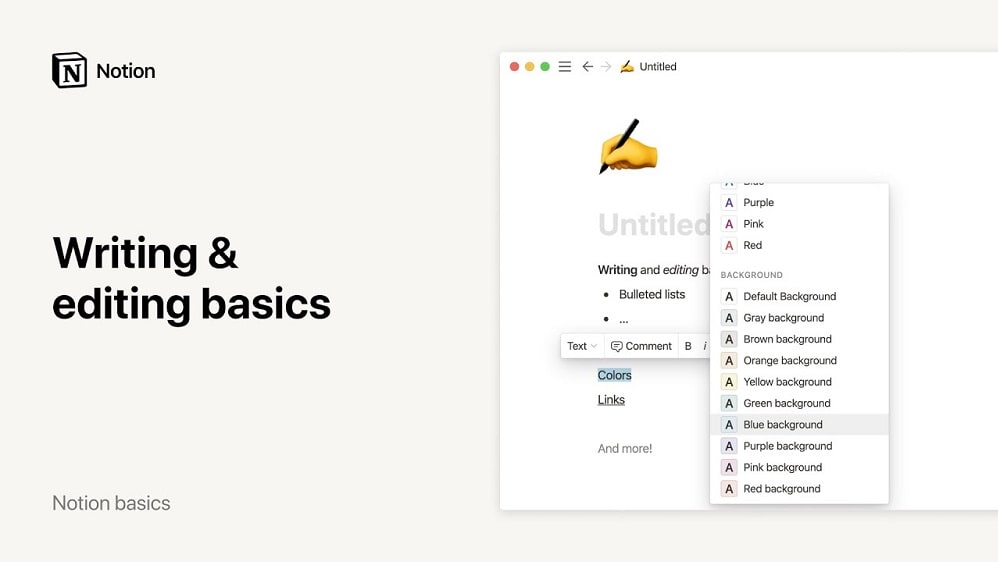
Notion provides an easy way to jot down thoughts and organize them effectively within its note-taking and document features.
Slite's Intuitive Editor and Notion's note-taking and document features prioritize user-friendly interfaces, ensuring a seamless content creation experience on both platforms. Slite's Intuitive Editor seamlessly adapts to users' workflows, facilitating efficient content creation and organization. Likewise, Notion provides an easy way to jot down thoughts and organize them effectively within its note-taking and document features.
For example, Slite's clean interface and real-time collaboration capabilities enable teams to brainstorm ideas, draft documents, and share feedback effortlessly. Similarly, Notion's versatile workspace allows users to create and organize notes, documents, and project plans with ease.
Slite's Simplicity Surpasses Notion's Complexity
Slite's clean layout and straightforward navigation make it exceptionally easy for users to adapt, even for beginners.
When it comes to user-friendliness, Slite surpasses Notion with its intuitive interface and minimalist design. Slite's clean layout and straightforward navigation make it exceptionally easy for users to adapt, even for beginners. Tasks that might seem complicated are simplified within Slite's streamlined framework, allowing teams to effortlessly navigate through features and workflows.
In contrast, Notion's extensive feature set offers robust capabilities but can overwhelm new users. The learning curve for Notion may be steeper, requiring time to explore and understand its myriad tools and capabilities. For teams seeking quick onboarding and seamless operation, Slite emerges as the preferred choice.
Notion's Project Management Feature Offers Broader Functionality as Compared to Slite's Analytics

Notion excels in project management with its holistic solution, encompassing task assignment, notifications, and project progress tracking.
Slite's comprehensive analytics function enables users to track content engagement within its platform accurately. For instance, users can monitor document views, edits, and comments, gaining insights into team collaboration and content performance.
On the other hand, Notion excels in project management with its holistic solution, encompassing task assignment, notifications, and project progress tracking. For example, users can assign tasks, set up reminders, and visualize project timelines, ensuring efficient project coordination and oversight.
While Slite focuses on content engagement analytics, Notion provides a robust project management framework, making it better suited for managing team tasks and projects comprehensively.
Notion's Customizable Templates are More Adaptable than Slite's Doc Verification

Notion elevates adaptability with its customizable templates, allowing users to create bespoke templates aligned with their specific business requirements.
Slite's Doc Verification feature enhances trust by validating information within documents, ensuring accuracy and reliability. However, Notion elevates adaptability with its customizable templates, allowing users to create bespoke templates aligned with their specific business requirements. For instance, Notion users can design templates for project management, meeting agendas, or client proposals, optimizing workflow efficiency and productivity.
In contrast, while Slite's Doc Verification fosters trust through verified information, it lacks the extensive customization options available in Notion. Notion's customizable templates empower users to tailor their workspace to suit their unique needs, striking a balance between trust and customization in document management.
Notion's Timeline View is More Comprehensive for Time Management than Slite's Analytics

Notion's Timeline view offers an interactive visualization that enhances planning and deadline tracking, providing users with a comprehensive overview of time-bound projects.
Notion's Timeline view offers an interactive visualization that enhances planning and deadline tracking, providing users with a comprehensive overview of time-bound projects. For example, users can visualize project milestones, deadlines, and task dependencies in a timeline format, facilitating efficient time management and resource allocation.
In contrast, Slite's Analytics feature focuses on content interaction data, offering insights into document views, edits, and comments. While valuable for understanding content engagement, Slite's Analytics does not provide the same holistic overview of time-bound projects as Notion's Timeline view.
Slite's AI-Driven Ask Feature Enhances Knowledge Accessibility

Slite's AI-assistant Ask feature revolutionizes information retrieval within its knowledge base, leveraging generative AI-powered queries to deliver swift and precise results.
Slite's AI-assistant Ask feature revolutionizes information retrieval within its knowledge base, leveraging generative AI-powered queries to deliver swift and precise results. This innovative functionality streamlines workflow by eliminating the need for extensive document browsing or prolonged searches. For instance, users can simply ask Slite's AI assistant for specific information, such as project details or meeting notes, and receive instant, accurate responses.
In contrast, while Notion boasts a robust knowledge base that centralizes information, locating specific details may require more time and effort. Notion lacks the AI-driven query system found in Slite, necessitating manual searches or navigating through nested folders to access desired information. Thus, Slite's AI-powered Ask feature provides a distinct advantage in enhancing knowledge accessibility and workflow efficiency.
08 Slite vs Notion: Which is the best for your business?
Slite is the best tool for you if:
- You value simplicity and a user-friendly interface for your team's collaboration and knowledge management needs, ensuring quick adoption and minimal learning curve for all team members.
- Real-time collaboration is a priority for your team, offering seamless communication and content creation capabilities that facilitate efficient teamwork and instant updates.
- You're seeking a streamlined solution for organizing your team's documents and notes, with structured directories and tagging systems for easy navigation and retrieval.
- You prefer a tool that integrates easily with other applications your team already uses, enhancing your workflow without the need for complex setups or configurations.
- Your focus is on content creation and sharing within your team, requiring a platform that supports straightforward document creation, editing, and organization for all team members.
 You value simplicity and a user-friendly interface for your team's collaboration and knowledge management needs, ensuring quick adoption and minimal learning curve for all team members.
Notion is the best tool for you if:
- You require a highly customizable workspace that can be tailored to fit a wide range of needs, from project management to personal note-taking, offering unparalleled flexibility.
- Your work involves complex project management that benefits from integrated databases, kanban boards, and advanced organizational tools, allowing for detailed planning and tracking.
- You appreciate having an all-in-one platform for note-taking, document storage, task management, and more, with extensive features that eliminate the need for multiple apps.
- Collaboration across diverse projects and teams is critical, and you need a versatile tool that supports a variety of content types and collaboration features.
- You're looking for a scalable solution that grows with your team or personal projects, offering powerful tools for organization, documentation, and workflow design that adapt to changing needs.
Notion
Organize teamwork and increase productivity
3 months free on the Business plan with Unlimited AI
Save up to $720
09 Alternatives to Slite & Notion

ClickUp
Used by 3412 members
Additional 20% off Unlimited and Business plans for 1 year
Save up to $1,000

Coda
Used by 1001 members
7 days free + 15% off annual plans
Save up to $720

Asana
Used by 926 members
75% off the annual Starter and Advanced plans for 1 year
Save up to $22,491

Confluence
Used by 248 members
Free forever for up to 10 users
Save up to $620
10 Promotions on Collaboration software
Slite and Notion are great tools, but Secret offers promo codes with discounts on over 2230+ different SaaS solutions. New deals are added regularly, helping you save money on your online subscriptions. Get access to codes for other Collaboration software you might want to purchase

Google Workspace discounts
20% off Standard plans for 1 year

Airtable promo
$1,000 in credits on licences for 1 year

Slack promotion code
25% off new plan purchases

Miro deal
$1,000 in credits (lifetime validity)

Monday deal
First month free
Asana free credits
75% off the annual Starter and Advanced plans for 1 year
Deal for ClickUp
Additional 20% off Unlimited and Business plans for 1 year

bolt.new promotion code
20% off all plans for the first 3 months

xTiles free credits
20% off monthly or annual plans

Google Drive promo code
20% off Standard plans for 1 year
Start saving on the best SaaS
Secret has already helped tens of thousands of startups save millions on the best SaaS like Microsoft Teams, Google Workspace & many more. Join Secret now to buy software the smart way.