


Selecting the right project management solution for your business enhances project planning and efficiency. By providing insights into tasks, workflows, and resource allocation, these tools also help with strategic decision-making. The good news? There are various tools on the market to assist with your project management. The bad news? It can be challenging to decide which one is best for your business.
That’s why we’ve prepared this in-depth comparison of two leading solutions—Asana vs Jira Software. It steps through the platforms’ key features and compares their main differences to equip you with the information you need to decide on the best solution for your project management needs.
- 01 Asana vs Jira: overview
- 02 What's the difference between Asana and Jira?
- 03 Asana pros and cons
- 04 Jira pros and cons
- 05 Asana compared to Jira
- 06 Jira compared to Asana
- 07 Features comparison
- 08 Asana vs Jira: Which is the best for your business?
- 09 Alternatives to Asana & Jira
- 10 Promotions on Collaboration software
Start saving on the best SaaS
Secret has already helped tens of thousands of startups save millions on the best SaaS like Microsoft Teams, Google Workspace & many more. Join Secret now to buy software the smart way.

01 Asana vs Jira: overview
Asana and Jira are two prominent players in the realm of project management software, each catering to distinct user requirements and project management approaches.
Asana is renowned for its user-friendly interface and intuitive task management capabilities. It excels in providing a platform that facilitates collaboration, task assignment, and project tracking with ease. Asana is an ideal choice for teams that value simplicity and agility in their project workflows. On the other hand, Jira is celebrated for its robust issue tracking and project customization features. It is particularly well-suited for teams that require intricate project planning, software development, or more advanced project management needs.
Now, let's dive into the Asana vs. Jira comparison to help you make an informed decision when selecting the right project management software for your specific needs.

Customer Support
Depending on the plan, the platforms offer a range of service support options, from community support to 24/7 support.

Asana
Jira
Pricing Plan
Asana and Jira offer free plans with varying inclusions. Asana’s paid plans start at $10.99/user/month, while Jira’s start at $8.15/user/month.
Asana
Jira
Customer Reviews
Both receive many positive reviews. Asana has a 4.5 Capterra rating from 12,000+ reviews, while Jira has a 4.4 rating from 13,500+ reviews.
Asana
Jira
Collaboration
While both platforms let users add comments to tasks, they primarily rely on integrations for collaboration. Asana also has an in-built message inbox.
Asana
Jira
Ease of Use
Both offer online training and user guides. Asana has an intuitive user interface, while Jira is easy to learn, especially for users with a technical background.
Asana
Jira
Task management
Asana offers broad task management features like task dependencies and workflow automation. Jira’s task management features support agile project management.
Asana
Jira
Reporting and analytics
Asana has broad reporting capabilities, with advanced reports available with higher plans. Jira includes 12+ reports with all plans plus data and insights with its Enterprise plan.
Asana
Jira
AI features
Asana Intelligence offers AI-powered features to help optimize content. Jira users can join a waitlist for early access to Atlassian’s AI assistant.
Asana
Jira
Security
Both have extensive security measures, including ISO certifications, AES-256 data encryption, SOC-2 compliance, and two-factor authentication.
Asana
Jira
Integrations
Asana’s 200+ integrations include Google Drive, Canva, and Vimeo. Jira offers access to Atlassian’s 1,000+ integrations, including Zephyr Scale, Figma, and Slack.
Asana
Jira
02 What's the difference between Asana and Jira?
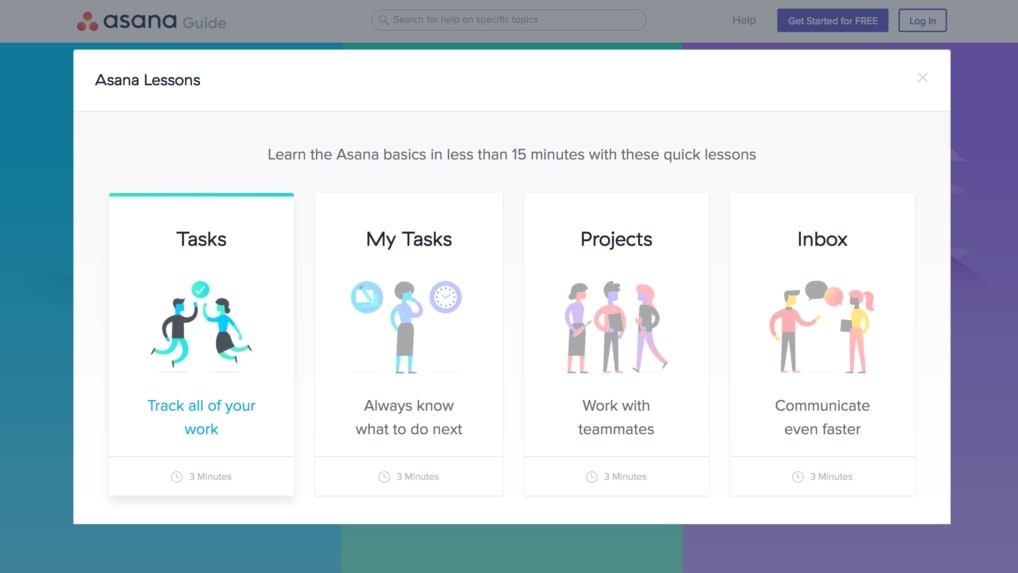
Asana, with a particular focus on task management, can be used across various industries to manage a wide range of project types.
Asana
Project management platform
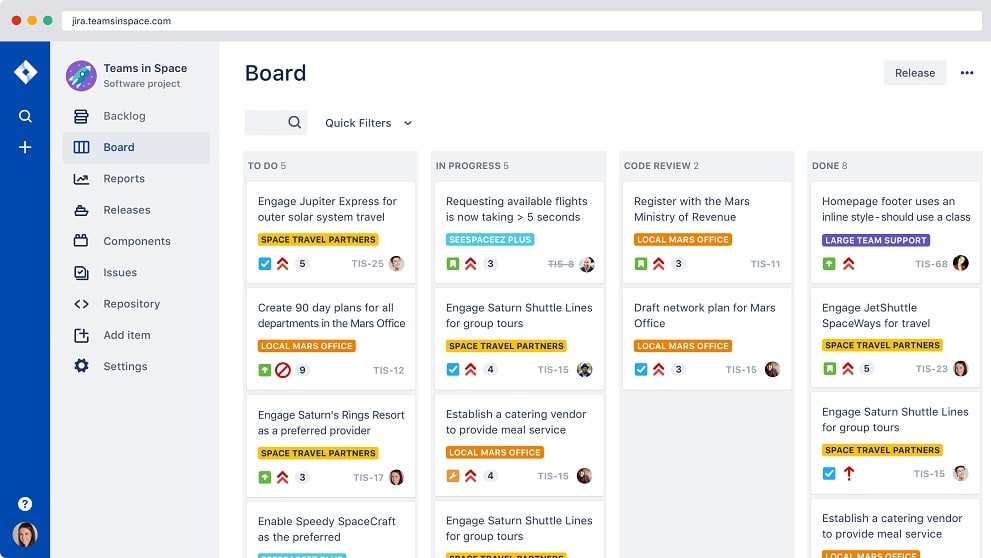
Jira is a project management tool specifically for agile teams, such as software developers.
Jira
Jira is a powerful project management tool designed to help your team organize, track, and manage their work efficiently. It offers versatile features for breaking down complex projects into manageable tasks, setting milestones, and mapping dependencies.
While Asana and Jira are both popular project management tools, it’s essential to understand their key differences to make an informed choice for your business. The main point of distinction is their use cases. Asana, with a particular focus on task management, can be used across various industries to manage a wide range of project types. Users can create, assign, and automate tasks, creating visual workflows tailored to their projects. With in-built task dependencies and diverse project views, including Kanban, Gantt charts, calendars, lists, and timelines, Asana supports agile methodologies and extends to broader use cases.
In comparison, Jira is a project management tool specifically for agile teams, such as software developers. While it accommodates general project management needs, the platform’s features are tailored to suit the requirements of development teams and are ideal for issue tracking. For example, Jira includes DevOps and bug-tracking templates. Features like sprints and custom workflows support agile methodologies, with a focus on Kanban and Scrum. What’s more, Jira is owned by Atlassian. As a result, Jira is available within the context of a suite of related products, like Trello, Confluence, and Jira Service Management. If your business already uses other Atlassian products and seeks an agile project management solution, Jira may be your pick.
Compared to Jira, Asana is a stand-alone product. However, its range of integrations makes it compatible with various other software applications. A final difference is the offerings of the platforms’ respective free plans. Asana’s free plan is designed for individuals and small teams of up to 15 users. It includes unlimited projects, tasks, and storage, along with basic workflows and reporting. Jira’s free plan is limited to 10 users and 2GB of file storage. It provides unlimited project boards plus customizable workflows, reporting, and full access to Jira Work Management.

Asana
Used by 873 members
75% off the annual Starter and Advanced plans for 1 year
Save up to $22,491

Jira
Used by 445 members
Free forever for up to 10 users
Save up to $980
03 Asana pros and cons
What are the advantages of Asana?
- User-friendly interface: Asana's intuitive and visually appealing interface makes it easy for users to get started and collaborate effectively. It has a low learning curve, making it accessible to teams of all skill levels.

- Task management: Asana excels in task management, allowing users to create tasks, assign them to team members, set due dates, and track progress efficiently. This helps in keeping projects organized and on track.
- Collaboration features: Asana offers robust collaboration features such as commenting, file attachments, and real-time updates. It promotes communication among team members, ensuring everyone stays informed and engaged.
- Integration ecosystem: Asana integrates seamlessly with a wide range of third-party apps and services, enhancing its functionality and allowing users to connect their favorite tools for a more streamlined workflow.
- Customization and reporting: Asana allows users to customize projects, task fields, and workflows to align with their specific needs. It also offers reporting and analytics features to gain insights into project performance.
What are the disadvantages of Asana?
- Pricing tiers: Asana's free version has limitations, and its premium plans can be relatively expensive for smaller teams or organizations on a tight budget.

- Complexity for complex projects: While Asana is user-friendly, it may not be as well-suited for extremely complex project management needs, especially in industries like software development where Jira may be preferred.
- Learning curve for advanced features: Some of Asana's advanced features, such as portfolio management, may require more time to learn and implement effectively.
- Limited dependency management: Asana's dependency management capabilities are somewhat basic compared to some other project management tools, which can be a limitation for projects with intricate task dependencies.
- Mobile app limitations: While Asana offers a mobile app, it may not provide the same level of functionality and ease of use as its web version, which can be a drawback for users who frequently work on mobile devices.
Compare Asana to other tools


Asana vs Monday

Asana vs ClickUp

Notion vs Asana

Airtable vs Asana

Asana vs Process Street

Asana vs Trello
04 Jira pros and cons
What are the advantages of Jira?
- Robust issue tracking: Jira is renowned for its powerful issue tracking capabilities. It allows users to create, prioritize, and manage issues with detailed information, making it particularly well-suited for software development and bug tracking.
- Customization: Jira offers extensive customization options, allowing teams to tailor their projects, workflows, and issue types to match their specific requirements. This flexibility is valuable for teams with complex or unique processes.
- Integration with development tools: Jira seamlessly integrates with a wide range of development and DevOps tools, such as Git, Bitbucket, Confluence, and more. This makes it a preferred choice for software development teams, as it facilitates end-to-end project management.
- Advanced Reporting and dashboards: Jira provides robust reporting and dashboard features, enabling teams to gain insights into project progress, performance, and bottlenecks. Customizable dashboards help keep stakeholders informed.
- Scalability: Jira can scale to meet the needs of small teams or large enterprises. It can handle complex projects and a high volume of issues, making it suitable for organizations of all sizes.
What are the disadvantages of Jira?
- Learning curve: Jira's extensive feature set can be overwhelming for new users, leading to a steep learning curve. Teams may need time and training to harness its full potential.
- Complexity for simple projects: Jira's robustness can be overkill for simple or small-scale projects, making it less efficient for teams looking for a lightweight solution.
- Cost: Jira's pricing can be relatively high, especially for larger teams or organizations that require many users and advanced features. This cost may be a barrier for smaller businesses or startups.
- Resource intensive: Running Jira can be resource-intensive, both in terms of hardware requirements and the time needed to maintain and administer the software.
- Limited non-technical features: While Jira excels in technical project management, it may lack some non-technical project management features that are more commonly found in dedicated project management tools, such as Gantt charts and resource management.
Compare Jira to other tools

ClickUp vs Jira

Zendesk vs Jira
Notion vs Jira

Freshservice vs Jira
05 Asana compared to Jira
Asana and Jira are popular project management tools, each with its unique strengths. Asana excels in user-friendliness, offering an intuitive interface for task management and collaboration. It suits teams seeking simplicity and flexibility.
In contrast, Jira stands out in issue tracking, making it a go-to choice for software development and complex projects. Its robust customization options and integration capabilities cater to advanced workflows. While Asana is user-friendly and ideal for general project management, Jira's power lies in its specialization for technical teams. Choosing between them depends on the specific needs and complexity of your projects.
Is Asana better than Jira?
 Is Asana better than Jira?
Determining whether Asana is better than Jira depends on your specific project management needs. Asana excels in user-friendliness and flexibility, making it a strong choice for general project management and collaboration across various industries. On the other hand, Jira is highly specialized for technical teams, particularly in software development, offering robust issue tracking and customization options.
If you require detailed issue management and integration with development tools, Jira may be the better option. However, if you prioritize ease of use and versatility for a broader range of projects, Asana could be the preferred choice. Ultimately, the decision should align with your unique requirements.
What is Asana best used for?
Asana is best used for managing and organizing tasks and projects collaboratively. It excels in facilitating task assignment, setting deadlines, tracking progress, and fostering communication among team members. This tool is particularly effective for teams across various industries seeking a user-friendly platform to streamline project management, from simple to complex tasks.
Asana's flexibility and ease of use make it a preferred choice for businesses, marketing teams, creative agencies, and individuals who want to maintain transparency, enhance productivity, and ensure projects stay on track. Whether for day-to-day task management or comprehensive project planning, Asana provides a versatile solution to meet diverse organizational needs.
Can Asana replace Jira?
While Asana and Jira are both powerful project management tools, they have distinct strengths and specializations. Asana excels in user-friendliness, making it suitable for a wide range of projects and teams. However, it may not fully replace Jira in environments requiring robust issue tracking and extensive customization, such as software development.
Jira's focus on technical workflows, detailed issue management, and seamless integration with development tools sets it apart. For non-technical projects and those prioritizing simplicity, Asana can serve as a viable alternative. Still, the decision to replace Jira with Asana should consider the specific needs and complexity of your projects and team requirements.
Is Asana cheaper than Jira?
The cost comparison between Asana and Jira depends on the specific needs and usage of your team or organization. Asana’s pricing typically offers a lower entry price point with a free plan and competitive pricing for its premium tiers. Jira, on the other hand, can be relatively more expensive, especially for larger teams or organizations with advanced requirements.
However, the advanced features and customization options in Jira may justify its higher cost for specialized technical teams. Ultimately, the decision on whether Asana is cheaper than Jira depends on your budget, the scale of your projects, and the features required to meet your project management needs.
Is there a better Collaboration software than Asana?
Determining if there's a superior software to Asana depends on your specific project management needs and goals. Several alternatives cater to diverse business requirements.
Alternatives to Asana include Trello, Monday.com, ClickUp, and Wrike, each offering unique features and strengths. For example, Trello is known for its visual simplicity and Kanban boards, while Monday.com excels in customizable workflows. The choice of the best software largely relies on your individual project complexity, team size, and functionality preferences. Carefully assessing these factors is essential in choosing the tool that aligns most effectively with your project management objectives.

Asana
Premium
Project management platform
75% off the annual Starter and Advanced plans for 1 year
Save up to $22,491
06 Jira compared to Asana
Jira and Asana are prominent project management tools, each with distinct advantages. Jira excels in issue tracking and customization, making it a top choice for technical teams, particularly in software development. Its seamless integration with development tools streamlines workflow.
In contrast, Asana prioritizes simplicity and user-friendliness, catering to a broader range of projects and industries. It focuses on task management, collaboration, and project organization. The decision between Jira and Asana hinges on your specific needs; Jira suits intricate workflows and development environments, while Asana provides versatility and ease of use for diverse project management requirements.
Is Jira better than Asana?
Determining whether Jira is better than Asana depends on your specific project management needs. Jira excels in issue tracking and customization, making it a preferred choice for technical teams, especially in software development. Its integration with development tools streamlines workflows. In contrast, Asana emphasizes simplicity and user-friendliness, catering to a broader spectrum of projects and industries. It prioritizes task management, collaboration, and project organization.
The choice between Jira and Asana should align with your unique requirements; Jira for intricate workflows and development environments, and Asana for versatility and ease of use in diverse project management scenarios.
What is Jira best used for?
Jira is primarily designed for issue tracking and project management, with a strong focus on technical and software development teams. It excels in managing and prioritizing tasks, tracking bugs, and facilitating collaboration among team members. Jira's robust customization options and integrations with development tools make it particularly well-suited for complex projects, agile methodologies, and software development life cycles. Its ability to create detailed workflows and manage dependencies is invaluable for teams seeking precision in project execution.
While Jira can adapt to various industries, it truly shines in environments where meticulous issue tracking and specialized project management are essential, making it a go-to choice for many technical teams.
Can Jira replace Asana?
Whether Jira can replace Asana depends on your specific project management needs. Jira excels in issue tracking and is ideal for technical teams, especially in software development, offering advanced customization and integration capabilities.
Asana, on the other hand, emphasizes simplicity and versatility, making it suitable for a broader range of projects and industries. While Jira can potentially replace Asana for complex technical workflows, it may not be the best fit for non-technical or general project management needs. Carefully assess your project requirements, team dynamics, and desired features before deciding if Jira can effectively replace Asana in your particular context.
Is Jira cheaper than Asana?
The cost comparison between Jira and Asana depends on factors such as the size of your team, feature requirements, and available budget. Asana generally offers a more accessible pricing structure with a free plan and competitive rates for its premium options.
In contrast, Jira's pricing can be relatively higher, particularly for larger teams or organizations with complex needs. While Jira may be perceived as more expensive, its specialized features and customization options may justify the investment for certain technical teams. Ultimately, the cost-effectiveness of Jira versus Asana hinges on your specific project management needs and financial considerations.
Is there a better IT Management software than Jira?
Determining whether there's a better software than Jira depends on your specific project management needs and goals. Numerous alternatives cater to diverse business requirements.
Alternatives to Jira include Asana, Trello, Monday.com, and ClickUp, each offering unique strengths. For example, Asana is prized for its user-friendliness and task management, while Trello's visual approach simplifies project tracking. The choice of the optimal software hinges on your individual circumstances, budget, and feature preferences. A thorough evaluation of these factors is crucial to selecting the tool that aligns most effectively with your project management objectives and enhances your team's productivity.

Jira
From ideas to action
Free forever for up to 10 users
Save up to $980
07 Features comparison
Jira and Asana are On Par with Issue Tracking and Portfolio Management
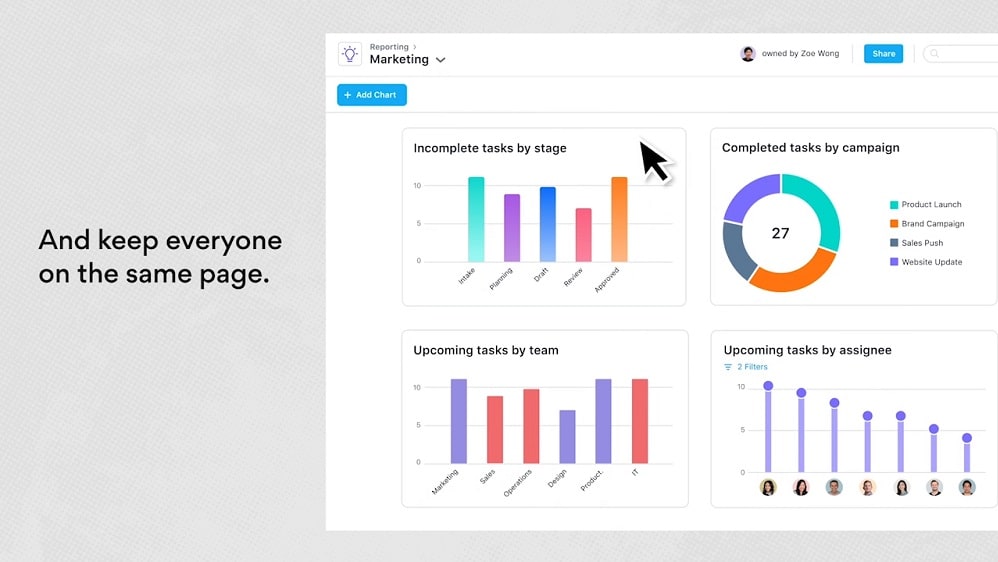
Asana's portfolio feature offers a high-level, bird's-eye view of all projects within an organization.
Jira and Asana, both formidable project management tools, excel in task tracking and project portfolio management, albeit in distinctive ways.
Asana's portfolio feature offers a high-level, bird's-eye view of all projects within an organization. This provides stakeholders with a centralized dashboard to monitor progress, allocate resources efficiently, and ensure alignment with strategic objectives. For instance, you can visualize project timelines, dependencies, and key milestones in a single view, making it easier to identify potential bottlenecks and make informed decisions.
In contrast, Jira shines with its robust issue tracking capabilities, ensuring meticulous task management. It is particularly favored by technical teams and software development environments. Jira's customizable workflows, issue types, and extensive integration options empower teams to manage tasks with precision and adhere to agile methodologies. For example, software development teams can track bug fixes, feature requests, and development tasks with ease.
Asana Excels Ahead of Jira for User-Friendliness

Asana's task management system serves as a prime example of its user-friendly design.
When it comes to ease-of-use, Asana emerges as the frontrunner. When comparing Asana and Jira for project management, Asana's intuitive interface stands out prominently. The user experience is notably smoother, especially for those new to project management tools.
Asana's task management system serves as a prime example of its user-friendly design. It simplifies the process with intuitive navigation, offering a visually appealing layout that aids in task assignment, setting deadlines, and updating task statuses effortlessly. Its drag-and-drop functionality enhances usability, making it accessible even to novices in the project management arena.
On the contrary, Jira, while robust and feature-rich, carries a steeper learning curve that can prove daunting for beginners or smaller teams lacking extensive technical expertise.
Jira's Agile Embrace Surpasses Asana in Team Collaboration

Jira's incorporation of agile boards, robust backlog management, and sprint planning tools exemplify its commitment to agile project management.
While Asana offers commendable inter-team collaboration features through shared projects and in-platform communication, Jira takes team cooperation to the next level by focusing on agile methodologies, a preference for many teams seeking streamlined project management.
Jira's incorporation of agile boards, robust backlog management, and sprint planning tools exemplify its commitment to agile project management. These features empower teams to organize work efficiently, prioritize tasks, and execute sprints seamlessly. The result is a highly synchronized team effort that ensures smoother project development.
In contrast, Asana, while proficient in collaboration, may lack the depth and agility-focused tools found in Jira, making Jira the preferred choice for teams seeking a robust agile project management approach.
Asana Excels at Automating Repetitive Tasks Compared to Jira
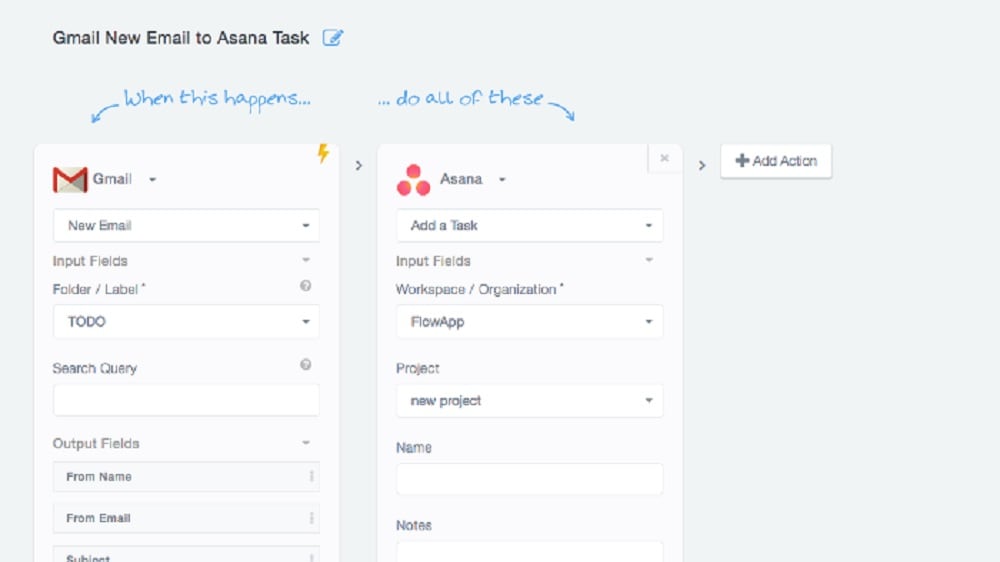
By configuring custom rules and forms, Asana reduces the likelihood of human errors and alleviates the workload on team members.
In the realm of workflow management, Jira and Asana each possess unique strengths that cater to distinct project management needs.
Jira stands out with its prowess in custom workflows, offering teams the flexibility to design intricate and tailored processes to suit their specific requirements. This capability is particularly advantageous for teams with complex project structures and diverse stages.
On the other hand, Asana's strength lies in its ability to automate routine and repetitive tasks efficiently. By configuring custom rules and forms, Asana reduces the likelihood of human errors and alleviates the workload on team members. For example, it can automate task assignment based on predefined criteria, send notifications, or trigger specific actions upon task completion. This automation not only enhances productivity but also simplifies project management by eliminating manual and time-consuming processes.
Asana Offers Better Project Timeline Visualization Compared to Jira
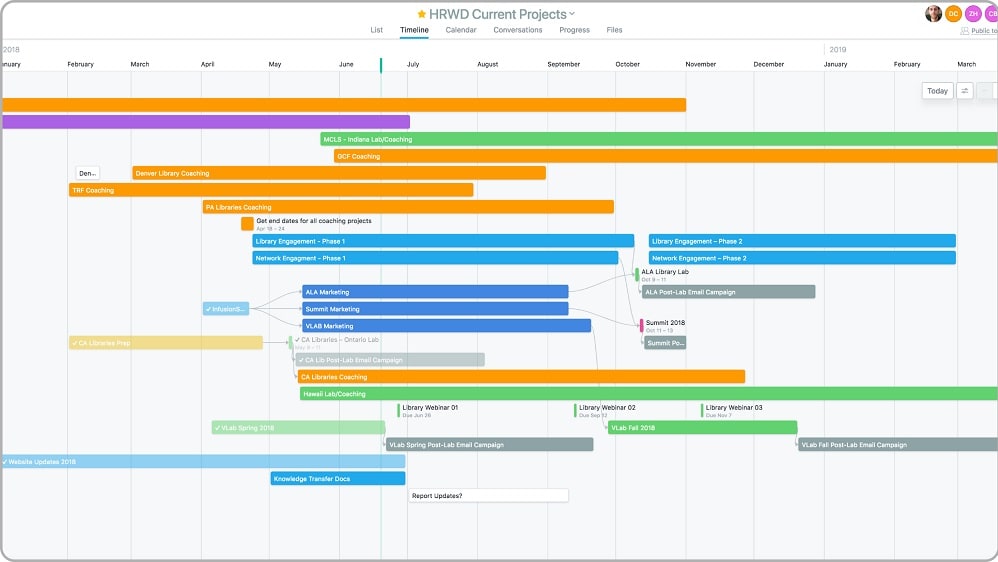
Asana's timeline view offers a dynamic Gantt chart-like display, allowing users to see project timelines at a glance.
When comparing project management tools Asana and Jira, both offer valuable insights into project performance metrics. However, Asana takes it a step further with its exceptional timeline view, which provides users with insightful visual representations of project schedules and task dependencies.
Asana's timeline view offers a dynamic Gantt chart-like display, allowing users to see project timelines at a glance. This visual representation simplifies the process of understanding project progress, identifying potential bottlenecks, and making informed decisions to keep projects on track. For instance, users can easily identify critical path tasks, visualize task dependencies, and adjust timelines as needed to ensure project objectives are met.
In contrast, while Jira provides project performance data, it may require additional plugins or configurations to achieve the same level of visual clarity and insight provided by Asana's timeline view.
Jira's Advanced Search and Filtering Outshines Asana in Task Analysis

This allows for granular analysis and reporting, especially beneficial for teams with intricate workflows and large datasets.
When it comes to task analysis and reporting, Asana and Jira offer distinct strengths that cater to different levels of complexity.
Asana excels in providing detailed reporting for task progress and workload analysis. Users can generate insightful reports on project status, task completion rates, and team performance. For example, Asana's workload view helps in resource allocation and balancing workloads among team members.
Conversely, Jira surpasses Asana with its advanced search and filtering functionalities. Users can create complex queries to delve deep into issue tracking. This allows for granular analysis and reporting, especially beneficial for teams with intricate workflows and large datasets. For instance, Jira's JQL (Jira Query Language) enables users to construct custom queries to pinpoint specific issues, and results can be filtered based on customizable criteria. This level of flexibility empowers teams to create comprehensive reports tailored to their precise needs.
Jira Leads in Integration Diversity Over Asana
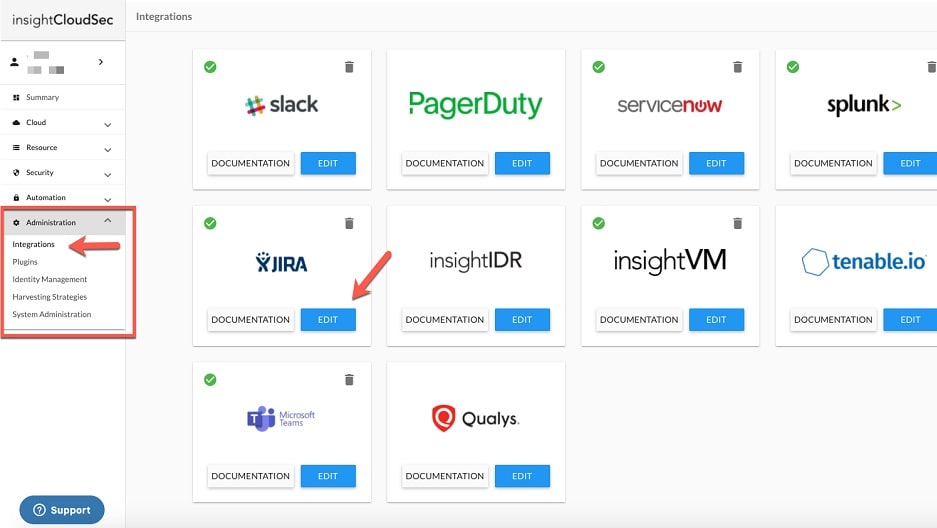
Jira takes the lead with its extensive range of integrations, particularly within the software development ecosystem.
Comparing the integration possibilities, Jira stands out as the clear frontrunner. In the comparison of Asana and Jira, both offer a wide array of integrations with various SaaS tools, enhancing their versatility.
However, Jira takes the lead with its extensive range of integrations, particularly within the software development ecosystem. One notable advantage is Jira's seamless integration with other Atlassian tools such as Bitbucket and Confluence. This synergy within the Atlassian suite enhances collaboration and streamlines development workflows, making it an excellent choice for companies deeply entrenched in the Atlassian ecosystem.
While Asana offers integrations with popular tools like Slack, Dropbox, and Google Drive, Jira's capability to facilitate more intricate workflows through its extended integrations gives it a distinctive edge in this category, making it the preferred choice for software development teams seeking comprehensive integration options.
08 Asana vs Jira: Which is the best for your business?
Asana is the best tool for you if:
- You need an intuitive task management platform that simplifies project organization and fosters collaboration among team members.
- Your team values a user-friendly interface with a low learning curve, making it accessible to users of all skill levels.
- Versatility is key, as Asana accommodates a wide range of project types, from simple task lists to complex project portfolios.
- You require seamless integration with various third-party apps and services to enhance your workflow and connect your favorite tools.
- Customization and reporting are crucial, as Asana allows you to tailor projects, tasks, and workflows to your specific needs and provides insights into project performance.
 You need an intuitive task management platform that simplifies project organization and fosters collaboration among team members.
Jira is the best tool for you if:
- You're part of a technical or software development team, as Jira excels in robust issue tracking and agile project management.
- Custom workflows are essential, as Jira allows you to design intricate and tailored processes to match your specific project requirements.
- Seamless integration with a wide range of development tools, such as Bitbucket and Confluence, is critical for your workflow.
- You require advanced search and filtering capabilities to analyze and report on complex data and workflows effectively.
- You need a comprehensive platform for managing tasks, sprints, and project portfolios while maintaining visibility into project timelines and dependencies.
Asana
Used by 873 members
75% off the annual Starter and Advanced plans for 1 year
Save up to $22,491
Jira
Used by 445 members
Free forever for up to 10 users
Save up to $980
09 Alternatives to Asana & Jira

Notion
Used by 16919 members
6 months free on the Business plan with Unlimited AI
Save up to $12,000

Google Workspace
Used by 9005 members
20% off Plus plans for 1 year
Save up to $518

Airtable
Used by 8177 members
$1,000 in credits for 1 year
Save up to $1,000

Slack
Used by 3697 members
25% off new plan purchases
Save up to $9,000
10 Promotions on Collaboration and IT Management software
Asana and Jira are great tools, but Secret offers promo codes with discounts on over 2190+ different SaaS solutions. New deals are added regularly, helping you save money on your online subscriptions. Get access to codes for other Collaboration and IT Management software you might want to purchase
Google Workspace coupon code 2026
20% off Plus plans for 1 year

CCleaner discount
20% off for 1 year
Airtable coupon code
$1,000 in credits for 1 year

GitLab promo code
12 months free on the Ultimate license
Promo codes for Notion
6 months free on the Business plan with Unlimited AI

Freshservice offer
14 days free
Slack discount code
25% off new plan purchases

Promo codes for Avast
50% off for 1 year

Code for Miro
$1,000 in credits (lifetime validity)

Promo codes for Instatus
1 year free on Pro Plan
Start saving on the best SaaS
Secret has already helped tens of thousands of startups save millions on the best SaaS like Microsoft Teams, Google Workspace & many more. Join Secret now to buy software the smart way.