


You're likely using Notion vs Zendesk as your "solution" to answer a seemingly simple question: Should you be running customer support inside a flexible workspace (docs + databases + lightweight workflow) or inside a dedicated service platform designed for queues, SLAs, and agent productivity?
I have watched teams achieve success with either solution, but only if the tool is aligned with the reality of their support motion (volume, channels, compliance, and the cost of inconsistency).
In this guide, I will make comparisons of the two solutions in practical terms: how they behave in real-life support scenarios; what they are truly good at; where they break down; and pricing.
If you want deeper product context first, check our Notion review and Zendesk review.
- 01 Notion vs Zendesk: overview
- 02 What's the difference between Notion and Zendesk?
- 03 Notion pros and cons
- 04 Zendesk pros and cons
- 05 Notion compared to Zendesk
- 06 Zendesk compared to Notion
- 07 Features comparison
- 08 Notion vs Zendesk: Which is the best for your business?
- 09 Alternatives to Notion & Zendesk
- 10 Promotions on Collaboration software
- 11 Notion vs Zendesk: Conclusion
Start saving on the best SaaS
Secret has already helped tens of thousands of startups save millions on the best SaaS like Microsoft Teams, Google Workspace & many more. Join Secret now to buy software the smart way.

01 Notion vs Zendesk: overview
There is only one area in which Notion and Zendesk diverge , helping teams manage both the data related to customers as well as their requests , but there are many ways in which they differ in terms of their approach to this common goal.
Notion provides a flexible modular workspace that contains documentation, wikis, project hubs, structured databases that can be formed into various types of request tracking systems (i.e., product feedback boards) and internal help desks. When you want a single place where team members can collaborate and share knowledge about your company, and you don’t mind designing your own workflow logic, Notion is often the right choice for your business.
Zendesk,is a full-service platform that includes all the tools needed to operate an efficient support operation, including ticketing, routing, automated workflows, multichannel communications with customers, and reporting. If you need your support to function similarly to an operating system , repeatable, auditable, fast , then Zendesk is typically the best solution for your organization.
The contrast between the two platforms will become apparent if you compare their key functions.

Pricing plan
Notion’s per-member pricing is predictable and broad-use; Zendesk is per-agent and can grow with channels, advanced workflows, and add-ons.

Notion
Zendesk
Customer reviews
Both are widely adopted and generally well-rated; the “best” choice usually depends on whether you need a workspace (Notion) or a service engine (Zendesk).
Notion
Zendesk
Customer support
Notion can track requests via databases, but Zendesk is built for ticket workflows, agent efficiency, SLAs, and omnichannel support at scale.
Notion
Zendesk
Ease of use
Notion is easy to start but can become complex when it’s standardized; Zendesk takes setup, but it’s very clear for agents once configured.
Notion
Zendesk
Security & permissions
Zendesk is designed around customer-data access control and service roles; Notion permissions are strong but require governance in complex workspaces.
Notion
Zendesk
Automation & workflows
Notion automations help with lightweight routing and reminders; Zendesk automation is deeper for operational support logic (triage, SLAs, tagging).
Notion
Zendesk
Ticketing / Case management
Zendesk dominates with native queues, macros, triggers, and escalation. Notion can mimic parts of this, but it’s not true ticketing.
Notion
Zendesk
Knowledge base
Notion excels for flexible docs and connected knowledge; Zendesk wins when the help center must tie tightly to tickets and deflection outcomes.
Notion
Zendesk
Reporting & analytics
Zendesk provides support-grade analytics and operational metrics. Notion dashboards are great for internal visibility but weaker for SLA and backlog intelligence.
Notion
Zendesk
Integrations
Both integrate broadly, but Zendesk’s ecosystem is support-centric. Notion integrates well for collaboration stacks; support depth varies by connector.
Notion
Zendesk
02 What's the difference between Notion and Zendesk?

Notion's workspace layout keeps tasks, habits, and expenses in one spot
Notion
Organize teamwork and increase productivity

Zendesk's ticket breakdown gives insights into team performance and daily volume
Zendesk
Zendesk leverages AI to ensure you can be available on any channel, at any time, quickly addressing your customers' requests and resolving their problems.
Notion is a workspace you can mold into a dozen different forms: wiki, project tracker, lite-CRM, request database, etc. Zendesk is a customer service platform built on one end-game objective: to manage customer communications as tickets, with predictable processes and quantifiable performance.
This is apparent at once in daily workflow processes. In Notion, your "support system" is generally made up of:
- An intake source (email form, chat, etc.)
- A database representing the requests
- A set of conventions (statuses, owners, priorities)
It is well-suited for teams who would like to turn support into a collaborative loop with product and engineering, especially if the volume of support is small enough, and/or you do not require rigid SLA governance.
In Zendesk, the system is already opinionated: tickets are first-class citizens, queues are real, automations route work, and agents use macros and triggers to respond quickly and consistently.
It is a safe bet when your support operation consists of multiple channels, multiple agents, escalation paths, and reporting requirements (backlog aging, SLA compliance, first response time, resolution time).
In short, Notion helps you organize knowledge and work. Zendesk helps you run support like an operation.

Notion
Used by 21097 members
3 months free on the Business plan with Unlimited AI
Save up to $720

Zendesk
Used by 2880 members
6 months free (with AI Agents and Copilot)
Save up to $50,000
03 Notion pros and cons
What are the advantages of Notion?
- Knowledge management: Notion is ideal for creating standard operating procedures (SOPs), troubleshooting playbooks, internal wikis, and customer documentation all in one place. Editing within Notion is rapid, and the knowledge is always located near where it gets executed.

- Structured databases: With Notion, you can structure your requests (bugs, feature requests, escalations) with properties, owners, priorities, etc. From those, you can create multiple views that connect directly to roadmaps, projects, release notes, and more.
- Workflow flexibility: Unlike traditional support systems, Notion allows you to design workflows that mirror your organization's needs instead of forcing support to fit into an inflexible schema. This is a significant benefit for organizations using non-standard processes.
- Cross-functional collaboration: Using mentions, comments, and shared pages makes it significantly easier to collaborate across departments such as support, product, and operations. Everyone works off the same "source of truth" objects.
- Predictable pricing for broad adoption: If many teams need access for docs and coordination (not just agents), Notion typically delivers more value per seat than a support suite.
What are the disadvantages of Notion?
- No native ticketing engine: There is no true queue system, SLAs (service level agreements), assignment rules, escalation logic, or agent-centric tooling that exists out of the box. You can create approximations, but it will feel like it is broken under pressure.

- Omnichannel is not a home advantage: Notion is not a unified inbox for email, chat, social, etc. If your support is conversation-rich, Notion will sit alongside the real conversation tools instead of replacing them.
- Support analytics are hard to standardize: You can build dashboards, but operational metrics (SLA breaches, backlog aging, time-to-first-response, etc.) require careful data hygiene and can become fragile.
- Permissions can get tricky: As teams scale, creating a workspace that is too open (risk) or too locked down (friction) becomes part of the project. Governance must be considered part of the project.
- Workflow drift over time: Flexibility is a gift and a curse; if conventions aren’t enforced, teams log “tickets” differently, which undermines reporting and triage quality.
Compare Notion to other tools


Notion vs Monday

Notion vs Asana

Coda vs Notion

ClickUp vs Notion

Notion vs Trello

Notion vs OneNote
04 Zendesk pros and cons
What are the advantages of Zendesk?
- Ticketing built for scale: Zendesk has true queue systems, routing, triggers, macros, escalation, and SLAs native to the application, so your process remains consistent even when volume increases.
- Operational control: Zendesk is designed to allow measurable performance: response times, resolution times, backlog health, and workload distribution are easier to manage.
- Automation depth: You can automate triage, tagging, assignment, escalation, and customer updates in a way that feels support-native, not something that has been improvised.
- Reporting & analytics: Zendesk provides strong leadership visibility and continuous improvement (process bottlenecks, seasonal volume changes, and agent performance trends).
- Support ecosystem: Zendesk is commonly evaluated against major service platforms (e.g., Salesforce Service Cloud, ServiceNow, Intercom), demonstrating a mature market and integration landscape.
What are the disadvantages of Zendesk?
- Cost scales with agents: Zendesk is priced based on the number of agents you employ, so as your team grows, so does your bill—particularly if you decide to add additional channels, AI, QA, or workforce add-ons.
- Setup isn’t optional: You'll want to set up fields, forms, routing rules, and reporting before you start using Zendesk; otherwise, the tool will feel heavy and provide less than full value.
- Less flexible outside support: Zendesk is extremely effective for support operations, but it is not a corporate-wide workspace for documentation, planning, and general project collaboration.
- Overkill for low volume: If you only receive a few inbound requests per month, Zendesk may seem like a highly advanced machine that is running idle at a red light.
- Knowledge can feel separate: Zendesk can store help content fairly effectively; however, teams that reside in documentation all day tend to find Notion's editing and structuring features preferable.
Compare Zendesk to other tools


Zendesk vs Fin (ex. Intercom)

Salesforce Service Cloud vs Zendesk

Zendesk vs Gorgias

Zendesk vs Salesforce

Help Scout vs Zendesk

Zendesk vs Freshservice
05 Notion compared to Zendesk
When you go with Notion as your primary tool, you're thinking about creating clarity and collaboration within your team; i.e., a place to put all of your internal knowledge and to create structure for how you'll handle internal workflows as well as a flexible way to report requests across teams.
When you go with Zendesk as your primary tool, you're thinking about delivering customer service; e.g., consistent case handling, high agent productivity, meeting your Service Level Agreements (SLAs), and having enterprise grade reports.
Is Notion better than Zendesk?
 Is Notion better than Zendesk?
Notion will be the best choice for you if "customer support" is deeply integrated into your product development process; e.g., startups where feedback directly influences the future development of your product, or B2B organizations where each escalation requires a deep level of coordination among internal stakeholders. This is because Notion is so much more than a ticket log. It's a context engine
If you are measured by the efficiency of your day-to-day operations, how quickly you can respond to customers, how clean you keep your queues, and how consistently you escalate issues to other teams, etc. Zendesk is generally going to be the better tool. While you could certainly incorporate Notion into this workflow, it typically does not run the entire workflow end-to-end without significant compromise.
What is Notion best used for?
Notion is best suited for building out the foundational knowledge base for your support organization; i.e., internal playbooks, troubleshooting workflows, macro libraries, product documentation, and "known issue" databases tied to releases and owners.
Notion is very good at tracking light-weight requests (e.g., bug intake, on-boarding requests, feature requests) where the ability to view and edit the record across multiple departments is required versus being strictly limited to the support department.
Can Notion replace Zendesk?
Notion will only replace Zendesk in specific narrow situations; i.e., low volume support environments, a single support channel, and little to no expectation of meeting strict SLAs and/or a workflow that is more task-oriented than conversational.
Once you have multiple agents, multiple support channels, time-sensitive obligations, and/or a requirement to route and escalate issues in a consistent manner, attempting to replace Zendesk with Notion will likely result in you rebuilding a full-fledged support platform from scratch inside of a general purpose workspace, which will be resource intensive and fragile when subject to a large volume of activity.
Is Notion cheaper than Zendesk?
Yes, in most cases, especially when many non-support employees need to have access to the same environment. Notion's pricing model is geared toward providing broad-based collaboration capabilities and its value increases exponentially once it has become a company-wide knowledge repository.
Zendesk is priced per agent and is more commonly justified when supporting performance is a critical business metric. As the complexity of your support workflows increase (i.e., as you add advanced workflows, AI-powered tools, and/or additional operational add-ons), Zendesk begins to behave more like an enterprise investment than simply a subscription-based SaaS offering.
Is there a better Collaboration software than Notion?
Depending on your constraints, there can be. If you want more traditional enterprise wiki governance, Confluence is often the first alternative. If you want a lighter documentation experience with less workspace sprawl, Slite is another common contender.
For a curated list, see our Notion alternatives page.
Can I use Notion as the main tool for handling support requests?
If your goal is to reduce the number of repeated support requests, Notion is an excellent tool as a single source of truth, but only if you treat it like a product. This means having defined owners, defined review cycles, and a well-defined information architecture, not simply a collection of random pages.
A practical pattern I recommend: Create a "Support Canon" in Notion (macros, troubleshooting, edge cases); then, use links to reference these assets from anywhere you are processing tickets. But if you attempt to use Notion as the primary inbox for your support requests, friction tends to develop.

Notion
Organize teamwork and increase productivity
3 months free on the Business plan with Unlimited AI
Save up to $720
06 Zendesk compared to Notion
When support is a separate function that has specific goals for performance measurement, Zendesk is a better base option. This is because Zendesk provides a high level of automation capability and consistent reporting for services.
Notion provides a suitable environment for storing all support-related documents and for cross-functional document sharing, particularly when you have a company that needs its documentation to evolve at least as quickly as its products do.
Is Zendesk better than Notion?
Yes. Zendesk is better suited for companies operating their customer support functions through a customer support operation. Zendesk is designed around the complete life cycle of a ticket from initial intake by the first responder to final closure of the ticket after resolution and the subsequent analytical capabilities for improving future responses based upon previous activity.
Although Notion could be a complementary application (for example for documentation, coordination internally and for product feedback loops), Notion cannot replace the native mechanisms of Zendesk for supporting functions without substantial manual design.
What is Zendesk best used for?
Zendesk is best used for organizations that require a reliable case management system that supports: multiple agents, multiple channels, well-defined ownership responsibilities, predictable escalations, and service level agreements that require the organization to meet established standards for providing service to customers.
Zendesk is also a good choice for organizations that need a way to report on workloads and performance, especially if organizational staffing decisions, quality initiatives or customer experience metrics require that leaders within the organization have access to reliable data for making informed decisions.
Can Zendesk replace Notion?
Zendesk can replace some of the functionality of Notion for internal notes for agents and a help center that is directly tied to ticket handling, however, it will not replace Notion as a comprehensive source for knowledge and collaboration for employees within the organization.
If your organization relies heavily on structured documentation, project pages and relational databases for tracking employee activities, then Zendesk will not be a comfortable place for those employees to spend time and will instead appear as just a tool for managing customer issues.
Is Zendesk cheaper than Notion?
The cost of using Zendesk per agent is reasonable when each agent is responsible for generating revenue (retention) or controlling costs (deflecting tickets and resolving them quickly).
If you are looking for a solution to track and store simple documentation and basic tracking, Notion will generally be less expensive. However, if you are trying to avoid having to deal with backlogs in customer support, then Zendesk may end up being a cost effective solution due to the potential for increased efficiency in day-to-day operations
Is there a better Customer Support software than Zendesk?
Sometimes. If you’re an SMB and want a simpler help desk, tools like Freshdesk or Zoho Desk are frequently considered. If you prioritize conversational support and proactive engagement, Intercom is another common alternative.
To compare options, see our Zendesk alternatives page. You can also explore related comparisons like Freshdesk vs Zendesk, Front vs Zendesk, or Zoho Desk vs Zendesk.
Who is Zendesk’s biggest competitor?
Zendesk is most often compared with platforms like Salesforce Service Cloud, ServiceNow, Intercom, and Freshdesk, because they map to different support archetypes (CRM-native service, ITSM-first enterprise service, conversational support, and SMB-friendly ticketing).

Zendesk
Create a customer success support suite that is accessible and available to your customers at all times.
6 months free (with AI Agents and Copilot)
Save up to $50,000
07 Features comparison
Zendesk Excels Ahead of Notion for Customer Support

Zendesk's agent workspace consolidates customer chats, emails, and order history into a single view
Here is the decapitalized and refined version. I've also smoothed out a few punctuation spots to make the professional tone really sing.
Zendesk has been developed with the goal of improving the efficiency of the agent's workflow: tickets, queues, routing rules, collision detection, macros, and escalation paths. The structural framework of the application is very important as it minimizes "support entropy"—the gradual degradation of support quality due to repeated duplication, misrouting, or silent delay of customer inquiries.
Notion can store customer inquiries in a database; however, Notion does not function as a true customer support inbox. A support conversation area will still be required, and the individual using the application will have to manually maintain the status of the various inquiries.
If the number of customer inquiries is greater than "low" volume, Zendesk will appear more as an operating system than a tool.
Notion Is Faster to Start; Zendesk Is Easier to Run Long-Term

Notion is simple to set up so productivity can start immediately
Notion has a low activation barrier: You can spin up a request database and a wiki in an afternoon, and it will feel productive immediately.
Zendesk requires initial configuration; however, the investment pays off over time because the tool enforces consistency, especially for teams using multiple agents for support where process variation becomes costly.
If you're experimenting with support tools, Notion is faster to deploy. However, if you're operating support day after day, Zendesk is generally steadier.
Zendesk Outperforms Notion for Automation & Workflows

Zendesk's skills-based routing keeps tickets in the right hands
Zendesk automation is designed for operational reality: triggers, SLAs, and routing logic that react to ticket fields, customer attributes, and time-based conditions. That’s what keeps queues sane when things get busy.
Notion automations can be effective for lightweight workflows, status changes, reminders, or basic routing, but they’re not a replacement for a mature ticket automation engine.
As a rule: if your workflow needs to be deterministic under pressure, Zendesk is the safer foundation.
Zendesk Pulls Ahead on Ticketing and Case Management

Zendesk's ticket breakdown reveals team workload and response flow
Zendesk uses tickets as first-class objects, providing native lifecycle controls such as assignment, priority, SLA timers, internal notes, public replies, and consistent handling across channels.
In Notion, a ticket is typically only a row in a database. While this may be sufficient for internal requests, customer support requires conversation continuity, routing logic, and auditability, particularly when customers follow up, escalate, or reference earlier threads.
Simply stated: if you require reliable case management, Zendesk is the specialized instrument; Notion is the versatile multi-tool.
Notion Beats Zendesk for Knowledge Base Flexibility

Build a Notion Wiki with linked databases and structured pages
The documentation features of Notion are considered an advantage by many users: rich pages, nested structures, and databases that transform static documents into dynamic systems (e.g., FAQs linked to releases, incidents linked to postmortem reports, or macros linked to edge cases).
Zendesk is capable of supporting a help center effectively, particularly when the objective is to provide knowledge related to a specific ticket and measure the deflection of tickets. However, the use of Zendesk for creating and organizing knowledge generally appears to be similar to a publishing system rather than a workspace.
Therefore, Notion generally outperforms Zendesk for teams that wish their knowledge to be collaborative, modular, and highly integrated with their internal processes.
Zendesk Dominates Notion on Reporting & Analytics
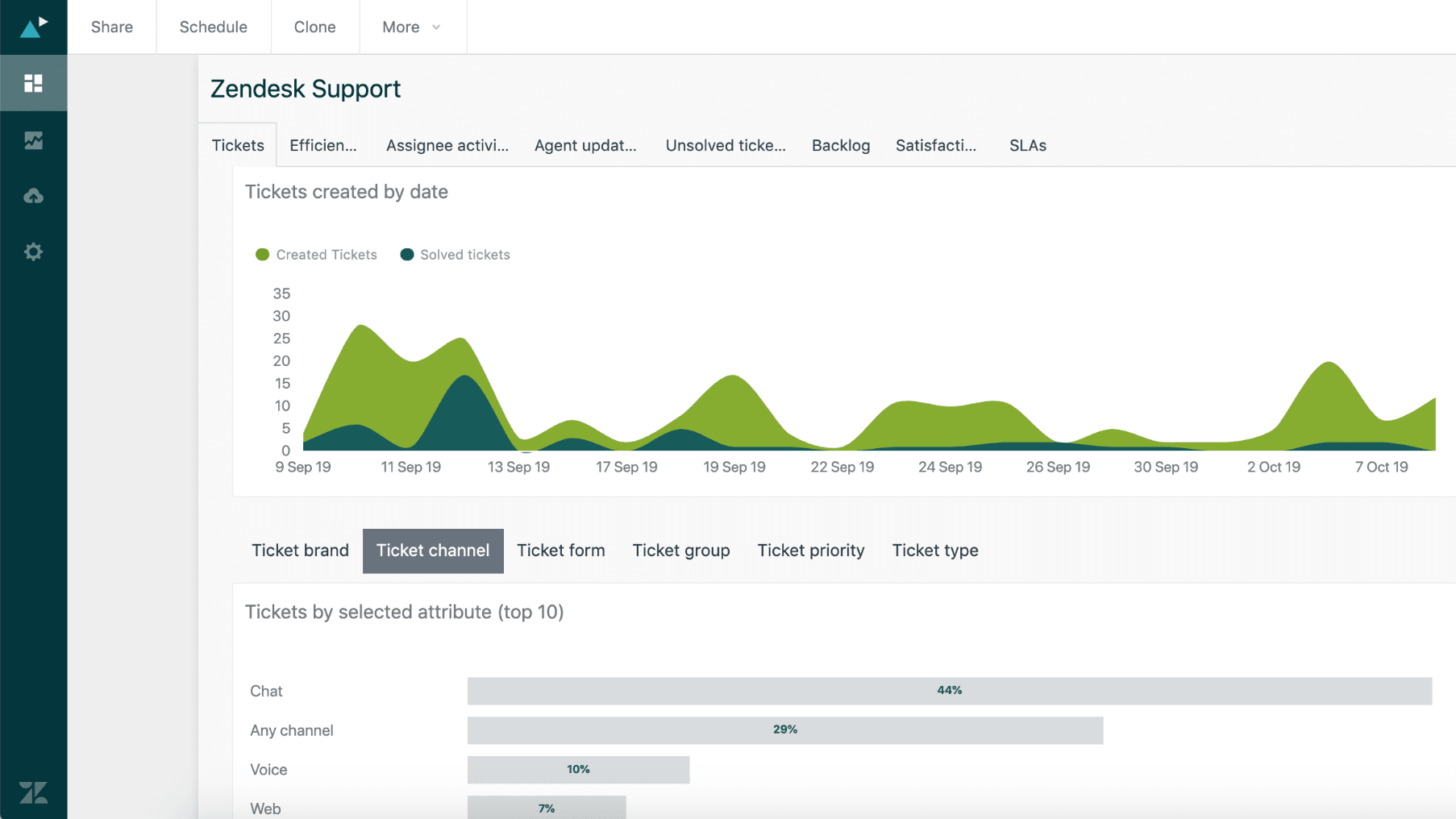
Zendesk turns ticket data into operational insight
Zendesk was designed to answer support leadership questions without heroic effort: trend analysis for backlog, where we breach SLAs, which categories are spiking, and how workload is distributed.
Notion can display dashboards and team views; however, support analytics require consistent event tracking (first response, resolution, reopen rates, backlog aging). It may be possible to approximate this through careful design; however, it is easy for the data model to drift.
If reporting is used to drive staffing and performance management decisions, Zendesk is typically the more dependable layer for analyzing support operations.
Zendesk Has More Support-Native Integrations; Notion Is More Workspace-Native

Zendesk's integration ecosystem for service operations
Zendesk's integration ecosystem is built around service operations, tools for messaging, QA, workforce management, CRM/service alignment, and analytics workflows.
Notion integrates well across collaboration stacks and can function as a strong hub for cross-functional context; however, it is not always the center of a support technology stack.
Choose based on where you wish gravity to exist: ticket execution (Zendesk) or knowledge and collaboration (Notion).
08 Notion vs Zendesk: Which is the best for your business?
Notion is the best tool for you if:
- You want a company-wide knowledge base that support, product, and ops can co-maintain without friction
- Your support volume is low enough that requests can be handled as structured tasks, not a high-velocity queue
- You need to connect customer feedback to roadmaps, incidents, and release notes in a single workspace
- You value flexibility and customization more than strict SLA enforcement
- You want predictable spend for broad collaboration across teams
 You want a company-wide knowledge base that support, product, and ops can co-maintain without friction
Zendesk is the best tool for you if:
- You need real ticketing: routing, macros, triggers, escalation, and SLAs
- You support customers across multiple channels and need one system to coordinate conversations
- You need leadership-grade analytics (backlog, SLA compliance, volume trends) to run support as an operation
- You have multiple agents and teams and want standardized handling rather than DIY workflows
- You’re ready to invest in a platform that scales with your service organization
Notion
Used by 21097 members
3 months free on the Business plan with Unlimited AI
Save up to $720
Zendesk
Used by 2880 members
6 months free (with AI Agents and Copilot)
Save up to $50,000
09 Alternatives to Notion & Zendesk

Airtable
Used by 8849 members
$1,000 in credits on licences for 1 year
Save up to $1,000

Slack
Used by 4015 members
25% off new plan purchases
Save up to $9,000

ClickUp
Used by 3444 members
Additional 20% off Unlimited and Business plans for 1 year
Save up to $1,000

Zoom Meetings
Used by 2898 members
$20 off per user on the annual Workplace Pro plan
Save up to $180
10 Promotions on Collaboration and Customer Support software
Notion and Zendesk are great tools, but Secret offers promo codes with discounts on over 2250+ different SaaS solutions. New deals are added regularly, helping you save money on your online subscriptions. Get access to codes for other Collaboration and Customer Support software you might want to purchase

Promo codes for Google Workspace
20% off Standard plans for 1 year

Freshdesk promo
14 days free
Promo code for Airtable
$1,000 in credits on licences for 1 year

Discount for LiveChat
$150 credits (Team, Business and Enterprise Plans)
Code for Slack
25% off new plan purchases

Manychat promo code 2026
First month free on Pro plan

Credits for Miro
$1,000 in credits (lifetime validity)

LiveAgent free credits
$120 credits on any plan

Credits for Monday
First month free

Aircall promo code 2026
First month free
11 Notion vs Zendesk: Conclusion
If you’re choosing just one tool to run customer support, Zendesk is usually the safer bet. If you’re choosing one tool to build a knowledge backbone and coordinate cross-functional work around customers, Notion is hard to beat. And in many mature stacks, the winning move isn’t “Notion vs Zendesk”, it’s Notion + Zendesk, with each doing what it does best.
If you’re cost-sensitive and want to optimize your tool stack, it’s also worth browsing software deals for startups to see which customer and productivity tools are currently discounted. For CRM-related savings in particular, you can check CRM software deals. Finally, if you’re benchmarking Zendesk against other help desk contenders, our Salesforce Service Cloud vs Zendesk comparison can help you understand where Zendesk fits in an enterprise-grade service stack.
Start saving on the best SaaS
Secret has already helped tens of thousands of startups save millions on the best SaaS like Microsoft Teams, Google Workspace & many more. Join Secret now to buy software the smart way.